Afterword

ThimphuTech was the first technology blog in Bhutan. We started writing it in 2009, just as broadband and mobile internet started to take off. (Although internet in Bhutan was launched in 1999, it was either super-slow or super-expensive, and was only used by a selected few).

In the blog, we wrote about technology and food, but also about plenty of other stuff. The blog became popular and influential in Bhutan. A companion bi-weekly column -- Ask Boaz -- was published for many years in the Kuensel, Bhutan's national newspaper. (The complete Kuensel columns are available as an ebook, Blogging with Dragons).

We stopped updating the blog when we left Bhutan in 2014, but the information within the posts can still prove useful, and thus we decided to keep it online.

We thank all our readers.
Tashi Delek,
Boaz & Galit.

Saturday, June 2, 2012

Secure Surfing (K2 #38)

Question of the Week 
My father has a DrukNet email account. Whenever he signs to read his email (https://webmail.druknet.bt), Firefox displays a warning message stating that the site cannot be trusted. Please help.
-- Barun Kumar

Answer
Barun,

First, a short introduction to secure Internet surfing!

When you surf the Internet, your browser uses a communications protocol to connect to the web server. The most common protocol is HTTP. To connect to a web page using HTTP, you type http:// at the start of the web address. For example, to connect to the RMA’s website, you type http://www.rma.org.bt. With most browsers today, you don’t need to type the http:// part - it is prepended automatically.

The problem with HTTP is that it is not secure. Information sent between your computer and the server is not encrypted. Hackers can eavesdrop on the connection and see exactly what you are doing. This is a concern especially when you surf wirelessly at Internet cafes. Of course, if you just surf RMA’s website to get the latest rupee crunch circulars then this is not too troubling. But imagine that you log into your email, or your bank account... And it can get worse: HTTP cannot guarantee that you are indeed connected to the server you wanted.

That is where another protocol - HTTP Secure, or HTTPS - comes into play. HTTPS solves the above two issues. First, it encrypts the information, so that bad guys who eavesdrop on your connection cannot understand what is sent and received. Second, HTTPS can verify the identity of the server you are connected to using a certificate that is bought from a third-party certificate authority.
Back to our question. Indeed, when going to https://webmail.druknet.bt , the Firefox browser shouts “This Connection is Untrusted”. Other browsers display similar warnings. Firefox cannot verify that you are indeed connected to DrukNet’s server. Why? Most likely DrukNet did not buy a certificate from a certificate authority, but rather created its own (something that anyone can do). Unfortunately your father doesn’t have a choice - if he wants to read his DrukNet email, he’ll have to take the chance and proceed by clicking the “I Understand the Risks” button.

Using HTTPS

To use HTTPS, you need to type https:// before the web address. For example, to connect to Facebook using a secure connection, use https://www.facebook.com. In fact, you can ask Facebook to always use HTTPS by turning on the “Secure browsing” option; After logging into Facebook, go to Account Settings, then Security, then under Secure browsing click Edit and make sure that the “Browse Facebook on a secure connection (https) when possible” is checked.

When you are using HTTPS, the browser will usually let you know. For example, Google Chrome will display a small green padlock just next to the web address. Click on the padlock for more information.


Readers are encouraged to submit technology-related questions to boaz@thimphutech.com

Tuesday, May 22, 2012

Data Journalism: good, free resources

Free for download and sharing
A recent advance in global journalism is "Data Journalism", which focuses on telling a story in a more compelling way, basing it on numbers and presenting the data effectively.

The new, free and online book Data Journalism Handbook provides a starting point and reference for journalists who want to base their stories on data and present them in a compelling way. The book was assembled by many journalists from top news agencies around the world, including BBC, The New York Times, The Guardian, Financial Times and Deutsche Welle.
The handbook defines and illustrates data journalism in difference ways, including: "Data journalism can help a journalist tell a complex story through engaging infographics."

Another interesting introduction to Data Journalism can be found in the series of free videos Journalism in the Age of Data: A Video Report on Data Visualization (also available in non-Flash and Podcast versions).


Saturday, May 19, 2012

Upgrading to Windows 8 (K2 #37)

Question

Should I upgrade to Windows 8?
-- Kinley D., Paro

Answer

Dear Kinley,

Hold your horses! Windows 8 is only scheduled for release in October 2012. It will include several new features, including a new tablet-compatible user-interface, an application store, and other nifty additions. But my recommendation is not to rush to upgrade. As with many new software product releases, it is often smarter to wait and not be on the “bleeding edge” of technology. Remember Windows Vista, the much-touted operating system? Most people were better off without it. If you are happy with your existing operating system, whether it is Windows XP or Windows 7, wait a few months after Windows 8’s release before making the leap.


Question

I often get a headache when sitting in front of the computer. Is this common?
 -- Jigme P., Bumthang

Answer

Dear Jigme,

Headaches can be caused by many factors, and it is always advisable to check out a recurring condition with a physician. At the same time, headaches are indeed common among those sitting long hours in front of the computer. Surprising as it may seem, our bodies have evolved to look for food and run away from bears, not to chat with our Facebook friends on a glowing screen. Sitting in front of a computer for long hours can create various health problems, including neck strain, backaches, vision issues and headaches. Some people even develop serious pain and numbness in the arm, a condition known as carpal tunnel syndrome which is caused by excessive typing on a keyboard.

Two changes to consider are (1) Get up every hour or so, stretch, walk around, and look at a far-off object to rest your eyes (2) Correct placement of the chair, desk, monitor, keyboard and mouse are necessary to prevent many of these potential health issues. There are also various accessories, such as a mouse pad with a wrist-rest that can help a lot. The following resource has good information and tips to help you get started: www.hp.com/ergo/pdfs/417893-003.pdf.

If your headaches persist even after making these adjustments, you may want to visit the physician after all.


Readers are encouraged to submit technology-related questions to boaz@thimphutech.com
Monday, May 14, 2012

Creating usernames for Facebook Pages


Like a growing number of organizations in the Kingdom, Bhutan Observer has a Facebook page which it is trying to promote. In an effort to encourage the readers to "Like" the page, BO has a weekly "Find us on Facebook" ad in the paper, which includes the web address of the Facebook page. Take a look at the address.  Is it easy to remember? It is convenient to type?

The solution: A username. Facebook allows people and pages to have their own username (e.g., facebook.com/ThimphuTech).

Many of the newspaper in Bhutan already have their own username, for example Kuensel (facebook.com/Kuensel) and The Bhutanese (facebook.com/TheBhutaneseNewspaper). Business-Bhutan and Bhutan Observer, on the other hand, are still using long and cumbersome addresses.

Getting your own username is easy. Go to facebook.com/username, and follow the simple instructions.

Sunday, May 13, 2012

Chart Crunch Continues: say goodbye to pie charts

The Bhutanese newspaper has been presenting front-page articles on the Rupee crunch, presenting different figures to tell a story. They are to be commended for using charts to present the data. Yet, there is much to be desired in terms of the choice of charts. Yesterday's front-page article "How private consumption and credit caused the Rupee crisis" featured the following chart for showing the different sources of private consumption Rupee usage:

From www.thebhutanese.bt (May 12, 2012 issue)

In an earlier post, we discussed why pie charts are ineffective for presenting data. We also showed that a bar chart is a much better tool for presenting counts and percentages. This particular pie chart suffers from an additional ailment: it uses 3D. In other words, instead of thin pizza slices we're looking at thick cake slices! While this might build up an appetite, note that the extra dimension does not represent any information. Even worse, it distorts our perception of size. You can see this by trying to figure out which consumption item contributes the most? While the purple slice in the front looks largest, it in fact represents the second largest item! (can you find the first?). If an important decision (such as a ban) would be made based on this misperception, it would be quite tragic.

Other questions are also difficult and time-consuming to answer with a pie chart. For example:

  • Which consumption item contributes the least?
  • How much does Transport contribute? How does this compare to Clothing & Footwear?
Now let's look at an effective chart for conveying the same information. It is not fancy or colorful, but it doesn't require much thinking as the facts just "pop out":

Sources of private consumption and credit

We see that the first two items are similar in their contributions and high compared to the others, then a drop to 10% for Clothing & Footwear, and lastly the other items contribute between 2%-6% each, with Alcoholic Beverages, Tobacco & Narcotics contributing the least.

The bottom line: forget pie charts and forget 3D. Counts and percentages are always best to convey with simple bar charts (you can find a few more examples on this page -- click on a pie chart to see a better bar chart alternative).

Using charts in the media is very important. It catches the reader's eye and can help summarize the story in one look ("a picture is worth a thousand words"). However, it is crucial that chart creators acquire the basic knowledge in creating effective charts. It's not rocket science, yet it makes a huge difference.

Monday, May 7, 2012

Buckwheat Cookies: Round Trip to Japan

We discovered delicious melt-in-your-mouth "sand cookies" made of local buckwheat at the Annual Tarayana Fair in Thimphu. Mysteriously, the packaging had a label in Japanese. When we inquired with the volunteers selling the cookies, they told us that local buckwheat is exported to Japan, where the cookies are prepared and packaged. Luckily, they took a return flight back to Bhutan!

The cookies are beautifully packed in small 5-piece bags (including a silica gel pack to absorb moisture), each at Nu. 25. Choose between sesame and walnut -- or get both!

Saturday, May 5, 2012

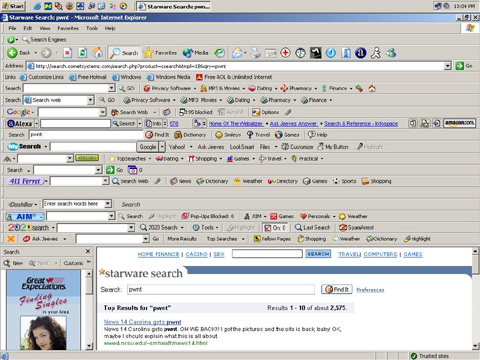
Disabling Unwanted Toolbars (K2 #36)

Question of the Week

My Internet Explorer is packed with so many of these toolbars. How do I get rid of them?
-- Sonam P., private sector

Answer

We are facing a real-estate crisis in Bhutan. No, I'm not talking about finding a reasonably-priced flat in 
Thimphu. I'm talking about your screen, which is a precious and limited resource. Think of it as expensive real-estate. It should be used for viewing web content, not useless toolbars! These toolbars often creep into your browser when you download and install free software from dubious sources. Fortunately, getting rid of these toolbars relatively easily.

To disable the toolbars, choose the Internet Explorer Manage add-ons menu option, then disable as many add-ons as you wish. Another option is starting Internet Explorer without any add-ons. Just click on the Start button (the round button at the bottom left), select All Programs->Accessories->System->Internet Explorer (No Add-ons). Consider also removing the toolbars by going to the Control Panel, selecting "Programs and Features", and deleting anything that looks suspicious. If you are using Google Chrome as your browser, the toolbar problem is not as bad as with Internet Explorer, but if a toolbar did manage to creep in, select Tools, then Extensions, and disable - or better yet, remove - all the superfluous toolbars. If only solving the housing shortage would be that simple...

In addition to getting more real estate for your web content, getting rid of these toolbars will also accelerate your computer, since toolbars slow it down. And your privacy will be better protected, as many of these toolbars track your actions and send that information to who-knows-where.

Google Drive

Got a Google account? Check out the new Google Drive (drive.google.com), an online storage service that allows you to save your files in the "cloud". Uploading a file to the cloud is very easy: You just drop it into a directory on your computer. The first 5GB are free. Existing services such as Microsoft's SkyDrive (www.skydrive.com, 7GB) and the popular DropBox (www.dropbox.com, 2GB) offer similar features.


Readers are encouraged to submit technology-related questions to boaz@thimphutech.com